Public and private monitoring
On this page
Every check is run by an agent: a small program that executes the checks Onagre schedules and sends back the results. Where the agent runs decides what it can reach.
Public monitoring: nothing to install#
The Onagre public agent runs on the internet. It checks anything reachable from the internet — your website, your public API, your certificates, your domain names — exactly as your customers would reach them. It is the default agent of every new sensor and needs no setup.
For your safety, the public agent only reaches public addresses: it refuses private networks (10.x, 192.168.x…), local addresses and cloud metadata endpoints.
Private monitoring: an agent inside your network#
To check what is not reachable from the internet — a PostgreSQL database inside your network, a Redis cache, an internal API, a RabbitMQ broker, a file on a server — you install a private agent in the network where those resources live.
Example. Corvane's order database
pg-primarysits in a private VLAN of its Paris datacenter. The team installs a private agent on a small Linux VM of that VLAN. The agent reaches10.20.1.21:5432directly; Onagre never needs to.
What it means for your network:
- The agent only makes outbound connections, over HTTPS (port 443), to the Onagre API and to the Hub — the Onagre service that schedules checks and collects results. No inbound port, no VPN, no firewall opening towards your network.
- What leaves your network: check results (up or down, timings, the error or measured value), the agent's own health (heartbeat, CPU, memory and disk of its machine) and basic system information (OS, version, hostname, public IP).
- What enters it: the checks to run — including, for database, Redis and RabbitMQ sensors, the connection string stored as a secret, used in memory only.
To filter outbound traffic by host, allow api.onagre.io and the Hub address printed in the agent's log at startup (Endpoint : …).
Agent types#
When you create a private agent, you choose its type. It cannot be changed afterwards.
| Core — Heartbeat only | Advanced — Full monitoring | |
|---|---|---|
| Reports that it is alive (heartbeat) | ✓ | ✓ |
| Watches its own machine (Server sensor: CPU, memory, disk) | ✓ | ✓ |
| Runs your sensors (HTTP, SQL, Redis, queues, files…) inside your network | — | ✓ |
| Network discovery | — | ✓ |
| Load monitoring (Agent load) | — | ✓ |
| Available on | paid plans | Enterprise plans |
Choose Core to know that a machine is up and healthy; choose Advanced to monitor the resources around it. Only Advanced agents appear in the Agent list of the sensor wizard.
Private agents are added to your subscription as packs of Core agents or as individual Advanced agents — see Plans. The Private agents card of the Agents page shows how many of each you use.
Agents in Onagre#
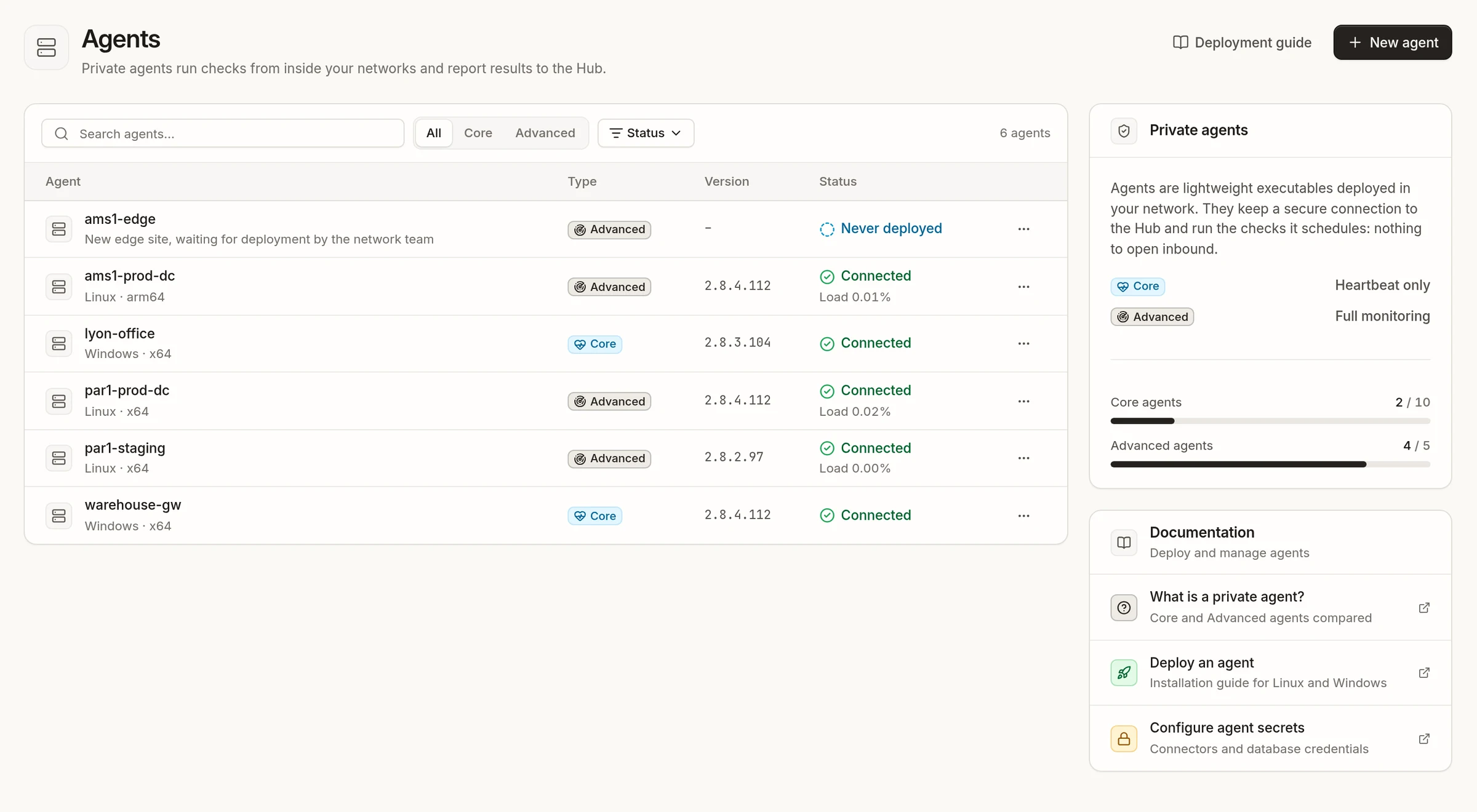
Configuration → Agents lists your private agents with their type, system, version, load and status:
| Status | Meaning |
|---|---|
| Connected | The agent sent a heartbeat within the last 90 seconds. |
| Disconnected | The agent has not reported for a while: an incident is open on its heartbeat. |
| Never deployed | The agent was created in Onagre but has never connected (shown as Not initialized on its page). |
A badge warns when an update is available for an agent.
Each agent's page has four tabs:
- Overview — the Agent load chart (concurrent tasks over the last 15 minutes, Advanced only) and the Status card: version, load, system, uptime, last heartbeat and Hub.
- Setup — name, description and tags, and the agent's token.
- Discovery — network discovery (Advanced only).
- Resources — the sensors this agent runs.
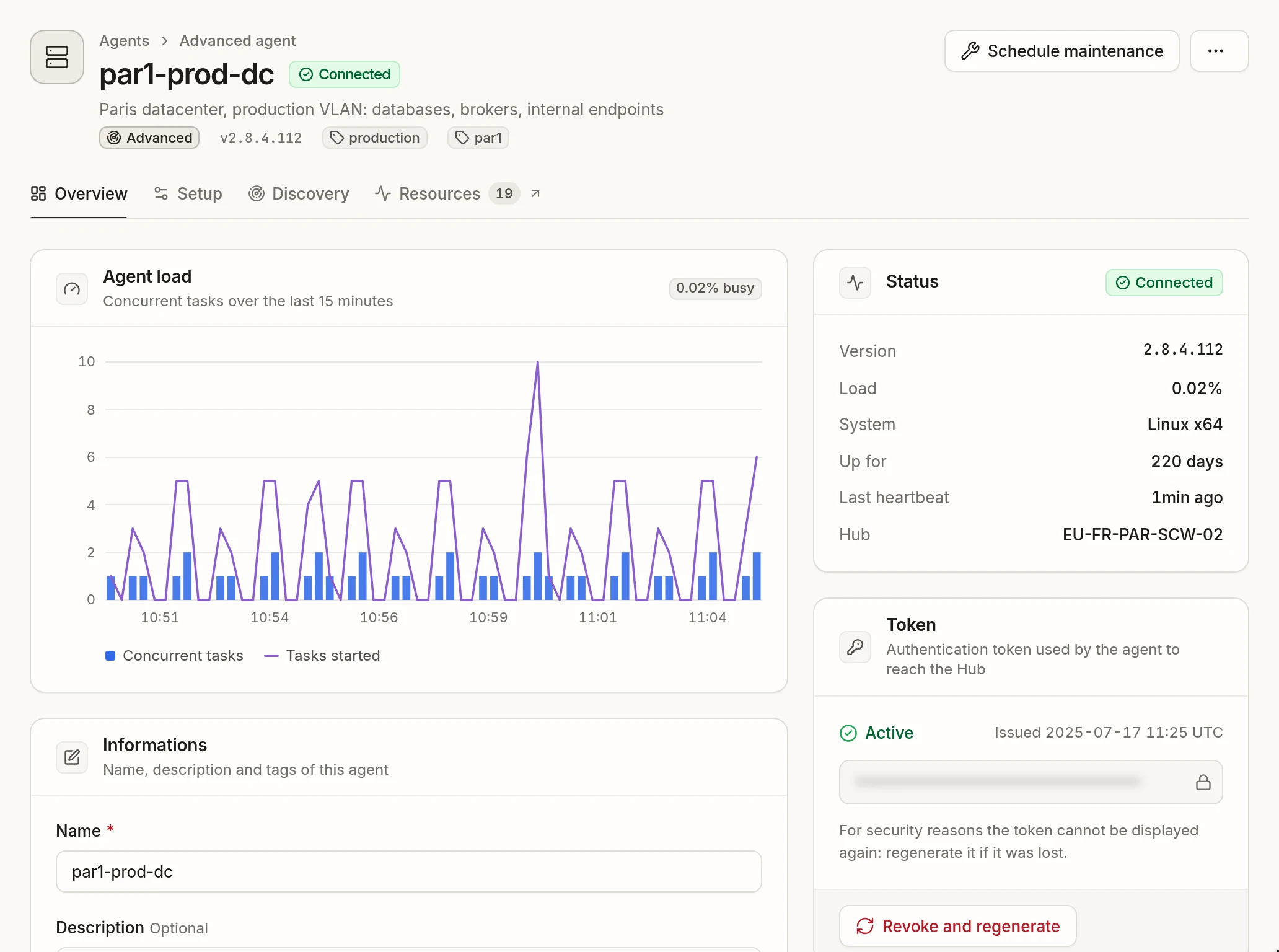
Schedule maintenance pauses the checks of this agent's sensors during planned work — see Maintenance windows. Delete agent removes it; an Advanced agent that still runs sensors cannot be deleted.
Sensors created with an agent#
Creating an agent also creates two sensors for it, in your default service and environment, alerting all your integrations:
- an internal heartbeat, which turns the agent Disconnected and opens an incident when it stops reporting;
- a Server sensor, with the CPU, memory and disk of its machine.
Next steps#
- Install an agent — create it in Onagre, then install it with the method that fits your infrastructure.
- Create sensors that run on it: choose it in the Agent section of the wizard.
- Store database and broker credentials as secrets.