HTTP
On this page
The HTTP sensor sends a request to a URL and checks the HTTP status code of the answer. Use it to know that a website, an API endpoint or a health route answers.
In the wizard: Website → Website availability, or API → HTTP status only.
Settings#
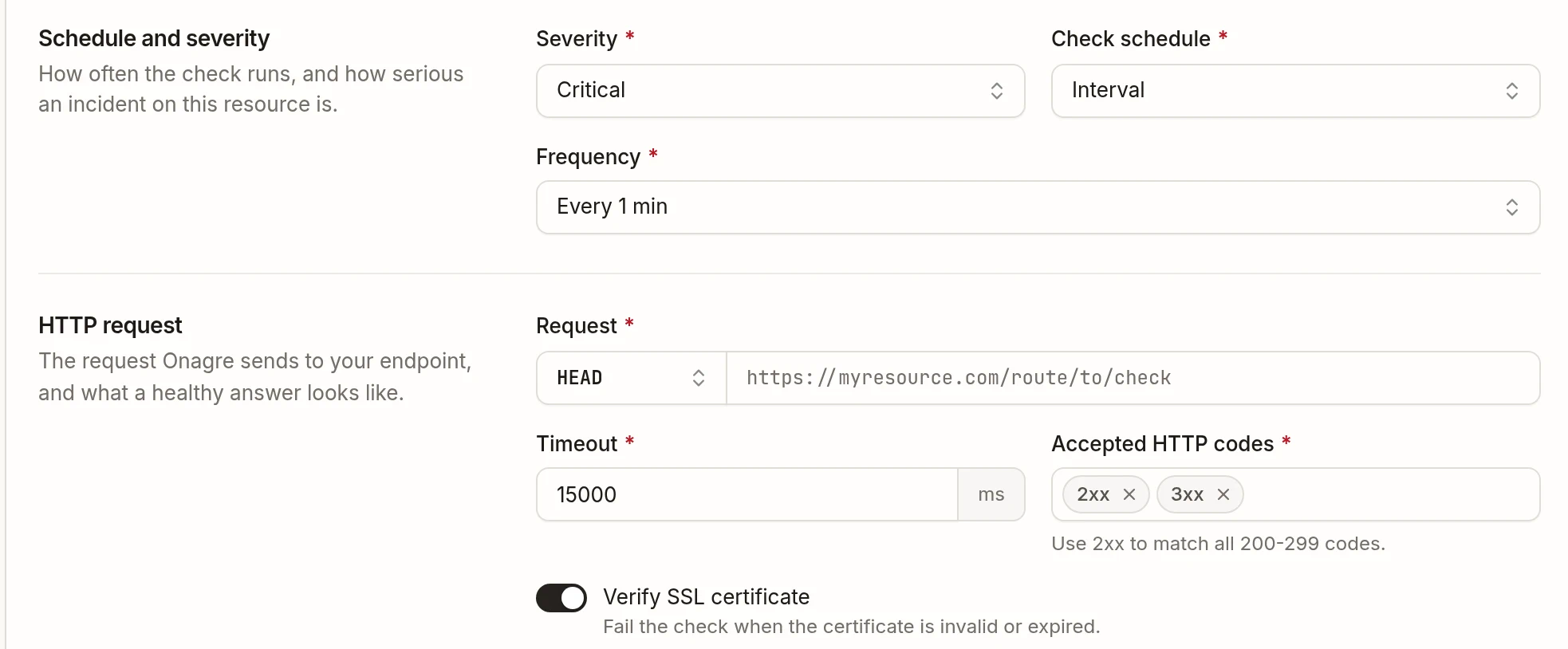
| Setting | Description |
|---|---|
| Request | Method and URL. HEAD (the default, lightest), GET, POST, PUT, PATCH or DELETE. |
| Timeout | Time allowed for the answer, in milliseconds. |
| Accepted HTTP codes | Codes considered healthy: exact codes (200, 204) or families (2xx). Default: 2xx and 3xx. |
| Verify SSL certificate | Fail the check when the certificate is invalid or expired. On by default. |
Show advanced options adds:
- Authentication — none, Basic (username and password) or Bearer token;
- Request body — a content type and a payload, for
POST,PUTandPATCH; - Headers — any header your endpoint needs.
Redirects are followed.
When is it healthy?#
When the endpoint answers within the timeout with an accepted code. A timeout, a connection error, an invalid certificate (when verified) or any other code fails the check.
Example#
Public API — Health: GET https://api.corvane.example/health, accepted code 200, every minute, severity Critical, alerting Slack #ops-alerts and the on-call phone.
Good to know#
- To check what the endpoint returns, use Keyword, JSON or XML: they share these settings and add a condition on the content.
- The URL, credentials and headers accept variables such as
${API_HOST}; the payload does not. - The public agent only reaches public addresses. For an internal URL, run the sensor on a private agent.